First-Party Cookies vs Third-Party Cookies – How it Affects GA4
You probably have heard someone saying “So third-party cookies are going away, right? Should we be worried?”.
We’ve been hearing this for many years now. The thing you should be worried about already happened, and it happened in 2019. Your GA4 data has probably been wrong since then, and you can actually verify that yourself in about ten minutes.
Continue reading!
What is the difference between”first-party” and “third-party”?
A cookie is just a small text file your browser stores when you visit a website. That is how websites remember who you are between visits / sessions. The technology and concept in itself is simple.
What can be slightly confusing is the naming. A first-party cookie and a third-party cookie are technically the same format, same mechanism. The key difference is who created it.
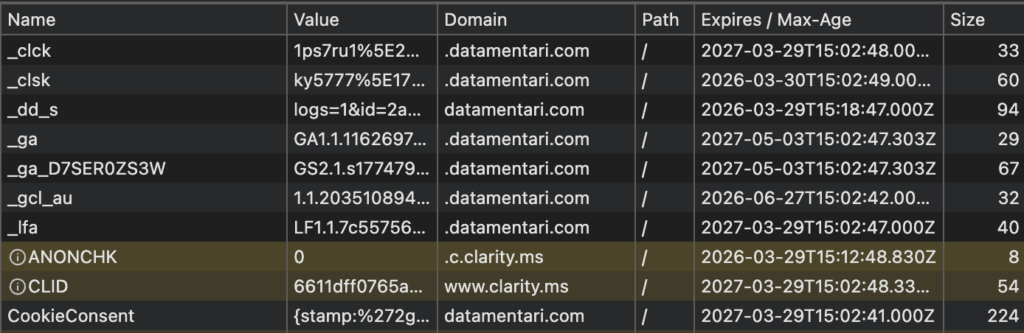
If you visit a website and that site drops a cookie, it’s first-party. Your GA4 tracking cookie (the ‘_ga’ cookie) works this way. So does whatever keeps you logged in.
Now, same scenario, if you visit the same website and a Meta tracking pixel fires in the network and drops its own cookie while you’re browsing a site that isn’t Meta, that’s a third-party cookie. You didn’t visit Facebook. A script embedded on the page communicated to Meta’s servers and set a cookie.
This is how ad retargeting has worked for the last twenty-something years. You browse shoes on one site, and then shoe ads stalk you across every other site you visit. All third-party cookies.
The browsers started killing them (sort of)
Apple got there first. Safari shipped Intelligent Tracking Prevention back in 2017 and started blocking third-party cookies by default. Their argument was pretty straightforward. People didn’t ask to be tracked across the web, so the browser should stop it.
Mozilla did something similar in 2018 – 2019 with Enhanced Tracking Protection in Firefox, blocking known third-party trackers for all new users. Fast-forward to 2022, they rolled out Total Cookie Protection, which isolates every cookie into a container that only the site owner can read. Even if a third-party cookie gets created, it can’t be read by any other site.
Google? They spent ~5 years saying they’d remove third-party cookies from Chrome. Then in July 2024, they changed their minds. And in April 2025, they said they will not introduce a third-party cookie “User Choice Prompt” in Chrome as previously planned to opt out. Third-party cookies stay in Chrome.
OK so that’s the state of play. Third-party cookies are gone from Safari and Firefox, still alive in Chrome. Most of the internet already knows this. What most people don’t realise is that the far more damaging thing happened to first-party cookies, and it happened quietly.
Here’s where it gets bad for your GA4 data
Safari didn’t stop after blocking third-party cookies. Apple went after first-party cookies too. The same cookies your analytics rely on.
This rolled out in stages. In early 2019, ITP 2.1 put a 7-day cap on first-party cookies set by JavaScript. GA4’s _ga cookie is set by JavaScript. So if someone visits your site on a Monday and doesn’t come back until the following Wednesday (9 days later), Safari has already wiped their cookie. GA4 generates a brand new Client ID for them. As far as your reports are concerned, that returning customer is a first-time visitor.
It got worse some months later. ITP 2.2 checked where the visitor came from. If they clicked through from a domain Safari flags as a tracker (Google, Facebook, and basically every ad network), and the URL had click ID parameters like ‘gclid’ or ‘fbclid’ or ‘msclkid’, the cookie lifespan dropped to 24 hours.
Think about what that means in practice. Someone clicks your Google Ad on Monday morning. They browse around, leave, sleep on it, come back Tuesday afternoon to purchase. Safari wiped the cookie overnight. GA4 has almost no idea this person clicked an ad yesterday. The purchase likely is attributed to direct traffic. Your Google Ads dashboard shows zero conversions for that click. You might look at that and think the ad didn’t work, when it absolutely did.
Then in April 2023, Safari 16.4 started capping even server-set cookies at 7 days in 2 conditions.
- The server setting the cookie is behind a CNAME that resolves (at any point) to a host that is third-party to the website the user is currently browsing.
- The server setting the cookie is set with A/AAAA records that resolve to an IP address (IP4 or IP6) where the first half of the address does not match the first half of the IP address for the server on the website the user is currently browsing. (e.g. 203.52.1.2 and 203.52.56.22 are okay, 201.55.1.2 is not).
This means the workaround people had been using to disguise third-party tracking as first-party has also been impacted. Plenty of server-side tracking setups got caught by this.
Your GA4 data has been likely wrong for Safari visitors since early 2019.
Have a look at your own GA4 right now
This takes a few minutes. Filter by browser on User attributed in GA4, and compare Safari and Chrome side by side. Compare the new-to-returning user ratio and session conversion rate.
Does Safari have a weirdly high percentage of “new” users compared to Chrome? That’s not because Safari users are discovering your site for the first time at some super high rate. It’s because Safari deletes their tracking cookies and GA4 treats every returning visit as a new one. A bit off-topic but relevant to cookies here is your Data Retention window is something worth checking too. It determines how long GA4 retains cookies that can be associated to a user.
How does this impact your reporting?
- New User numbers go up (fake)
- Returning User numbers go down (also fake)
- User journeys get fragmented so you can’t see the real path to conversion
- Your cost-per-acquisition gets inflated because you’re dividing spend by a user count that’s inflated to begin with.
Not every single visitor on Safari and Firefox is affected. But any Safari user who doesn’t return within 7 days, and any Firefox user on a known tracker domain who goes 30 days without a visit, looks like a new person every time.
Chrome isn’t bulletproof either
Chrome defaults to a 2-year ‘_ga’ cookie, which sounds generous until you learn that Chrome 104 capped all cookie lifetimes at 400 days back in August 2022. That’s ~13 months.
Third-party cookies still work fine in Chrome, which is why your Facebook Pixel and Google Ads tags collect data normally there. But the broader direction is still toward more privacy restrictions, and Google is still developing Privacy Sandbox as a long-term alternative to cookie-based tracking.
On top of that, roughly 1.77 billion people now use ad blockers worldwide as of mid-2025, per Backlinko’s analysis of GWI data. That’s 29.5% of global internet users. For some of these tools, they don’t just block ads – but they also strip tracking scripts entirely. That way, cookies never get set in the first place.
The practical breakdown by cookie type
As of lately, here are the specifics with the nuance that matters.
Third-party cookies (set by someone other than the site you’re on):
Third-party cookies
- Safari blocks them outright.
- Firefox blocks known trackers and sandboxes everything else.
- Chrome still allows them.
First-party cookies created by Javascript (this includes _ga by GA4)
- Safari gives them ~7 days, or 24 hours if the visitor clicked through from a classified ad platform.
- Firefox handles them normally unless the domain is on its tracker list, in which case all data gets wiped after ~30 days of inactivity.
- Chrome gives them ~400 days.
First-party cookies set through server HTTP headers (server-side tracking)
- Safari doesn’t cap these unless the server IP mismatches the site’s IP, in which case 7 days again.
- Firefox and Chrome both allow them.
When you set cookies from a server on your own domain with an IP that matches your site, you get the best possible treatment from every browser. That’s why server-side tracking future-proofs tracking setups.
Fixing it
Start by measuring how bad the gap is on your site specifically. The GA4 browser comparison I mentioned earlier will tell you quickly. If Safari and Chrome user metrics look dramatically different for no obvious business reason, you’re seeing cookie expiration at work.
The actual fix is server-side tracking. You move data collection off the browser and onto a server you control, which sets cookies through HTTP response headers instead of JavaScript. With the server IP matching your domain IP, those cookies survive Safari’s restrictions. Google Tag Manager has a server-side container built specifically for this.
If you have any kind of login or authentication on your site, send a User ID to GA4. That gives you identity resolution that doesn’t touch cookies at all. Doesn’t matter what browser they’re using or what ITP version Safari is on.
And honestly, even after fixing all of this, treat GA4 user counts as directional rather than exact. They were never perfectly accurate, even before ITP existed. Browsers get cleared, people switch devices, cookies get blocked by extensions. For the numbers that end up in client reports or board decks, reconcile against your actual backend data.
Final note
Everyone spent the last five years worrying about Chrome killing third-party cookies. Meanwhile, Safari quietly degraded first-party cookies starting in 2019, and most GA4 setups have been reporting inflated user numbers ever since.
Server-side tracking fixes this. It isn’t particularly expensive to implement. They’re just not the default configuration, and most businesses never move past the default config.
That’s the difference between the sites with clean data and the ones making budget decisions on numbers that could have been ~15-20% off for years. Fix it and you’re ahead especially when you’re relying on pixels for ad optimization and re-targeting.