
“Third-party cookies are going away. Will GA4 stop working?”
GA4 already uses first-party cookies for its usual website measurement. Blocking third-party cookies alone won't stop that setup from working.
The more useful question is whether GA4 can recognise a visitor when they come back. First-party cookies can expire, visitors can decline them, and browsers can restrict them. Your purchase event may still arrive, while the connection to an earlier visit disappears.
To see how that happens, start with what the cookie actually does.
What makes a cookie first-party or third-party?
A cookie is a small piece of data stored by a browser. Websites use cookies to remember things such as a login, a preference or an identifier between visits.
Suppose you're browsing an online shop. A cookie stored for the shop's site is being used in a first-party context. A cookie belonging to a separate advertising site, used through content embedded in the shop, is being used in a third-party context.
The company that supplied the script doesn't decide the classification. Code from another company can set a first-party cookie on your website, which is how the usual GA4 web setup works.
GA4's _ga cookie helps distinguish users; _ga_<container-id> persists session state. Google specifies a two-year default expiry for both, subject to your configuration and the browser's limits. You can find the names and settings in Google's GA4 cookie reference.
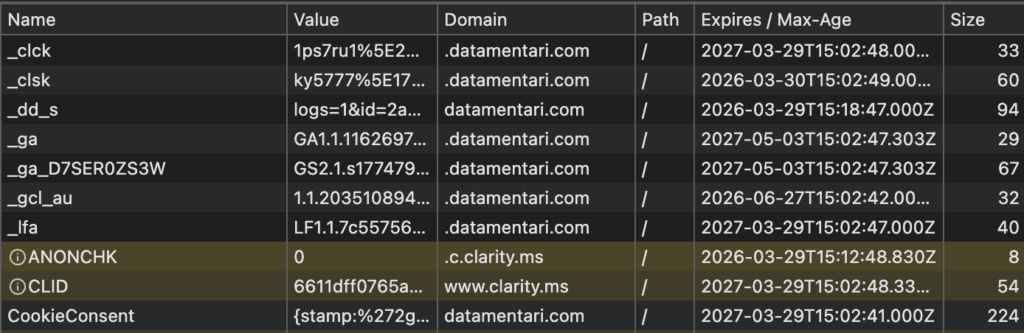
That browser identifier is useful, but it isn't a person. The same person can use two browsers, clear their cookies or return with a different device.
Follow one visitor across two visits
Someone clicks an ad, looks at a product and leaves to think about it. With the necessary consent, GA4 records the visit using the browser's identifier.
Later, they return and buy. If the identifier is still available, it helps GA4 connect their activity. If it has gone, GA4 may record the return under a new identity unless another supported identifier connects the visits.
The order can still appear in GA4. What's missing in this example is the link between the two visits. That can make returning activity look new and leave an incomplete record of the steps before the purchase.
It takes a separate check to work out how the sale was attributed. Session acquisition and key-event attribution answer different questions, and some reports include modelled results. A missing GA4 cookie alone doesn't tell you what a Google Ads conversion action will report, either.
This also explains why a higher user count doesn't establish a cost-per-acquisition problem. CPA divides cost by acquisitions or conversions. Missing conversions can push reported CPA up; recording one person under two identities is a different issue. Check the conversion count before drawing a conclusion about CPA.
What the main browsers change
Safari limits more than third-party cookies
Safari introduced Intelligent Tracking Prevention in 2017 and moved to full third-party cookie blocking by default in 2020. Its restrictions also reach first-party measurement.
In 2019, ITP 2.1 capped persistent cookies written through JavaScript at seven days. Later protections extended deletion to other script-writable storage after seven days of Safari use without interaction with the site. Moving an analytics identifier into local storage therefore doesn't provide a dependable way to keep it.
Some visits face a shorter cookie limit. When an ITP-classified domain sends someone to a landing URL containing a query string or fragment, persistent cookies written through JavaScript on that page can be capped at 24 hours. The navigation and classification matter; the presence of gclid or fbclid alone isn't the complete test. WebKit describes the ITP 2.2 conditions here.
These rules help explain how the connection in our two-visit example could break. The actual result depends on the visit, the available identifiers and your implementation, so a return after a particular number of calendar days isn't enough to diagnose it.
Firefox separates cross-site cookies
Firefox blocks cookies from cross-site trackers and partitions other third-party cookies by the website where they're used. This limits the reuse of a cookie across unrelated sites. Separate bounce-tracking protections can also clear storage under their own conditions.
For your GA4 setup, the useful questions are whether the tag loads, whether the site's first-party identifier is available and whether it remains available on a repeat visit. A blanket statement that Firefox has “removed cookies” won't answer any of those.
Chrome retains user controls
In April 2025, Google said Chrome would retain its existing third-party-cookie controls rather than introduce the previously proposed standalone prompt. Incognito blocks third-party cookies by default. Individual settings and extensions can also affect collection.
Chrome limits a persistent cookie's expiry to 400 days from when it is set, even when GA4 requests two years. A repeat visit can refresh that expiry. It isn't a fixed reset 400 days after someone's first visit, and the user can clear cookies earlier.
Older articles may also describe Privacy Sandbox as the coming replacement for third-party cookies. Google announced plans to retire several major technologies, including Topics and Protected Audience, in its October 2025 update.
Find out whether the browser difference matters on your site
Open GA4's Tech details report and select Browser, or create a free-form exploration with Browser as a row dimension. Start with a period that gives you enough traffic to compare. Four weeks can work for a first pass; a small site may need longer.
Look at new users, returning users, sessions and the outcomes you care about. In an exploration, add Session key event rate where available. New and returning users describe activity over the selected period, so don't treat them as a clean, mutually exclusive split of your audience.
Then narrow the comparison by device category, country and traffic source. A Safari audience made up mainly of mobile visitors can behave differently from a Chrome audience made up mainly of desktop visitors. Campaigns and consent choices can differ too.
If a gap stands out, look for when it began. A consent-banner change, checkout release or campaign launch gives you a more specific starting point than the browser name alone. Reproduce the relevant journey and inspect the cookie, identifier and measurement requests before and after the action.
The report can point you towards a problem. It can't show visits that were never collected or tell you how many were lost to a particular browser restriction. For the broader collection checks, use the 10-minute GA4 setup review.
Changing data retention won't extend a cookie
GA4 has two settings that are easy to confuse.
Cookie expiry concerns the identifier stored in the visitor's browser. You configure it through the web stream's Google tag settings or your tagging implementation, and the browser can impose a shorter limit.
Data retention concerns detailed user-level and event-level data held on Google's servers. It affects explorations and funnel reports; standard aggregated reports are generally unaffected. Increasing it can preserve more detailed historical data for analysis, but it won't keep the visitor's cookie alive. Google's retention documentation explains which reports are affected.
Choose the setting that addresses the problem you found. An exploration that no longer contains older detail needs a different response from a browser that arrives with a fresh identifier.
Choose the repair that fits what you found
If collection changes with the consent choice, start there. Test the first load, acceptance, rejection and a later change of mind. In basic consent mode, Google tags are blocked until consent is granted. Advanced mode can send restricted cookieless pings when storage consent is denied. Those pings still transmit data, so the implementation needs to fit your privacy requirements and respect the visitor's choice.
Behavioural modelling can supplement eligible GA4 reports. It requires an advanced implementation and enough suitable data, and meeting the published thresholds doesn't guarantee eligibility. It estimates activity rather than reconstructing a known journey for each person who declined cookies. Review Google's modelling requirements before treating modelled data as part of your reporting.
If people sign in, a consistent User-ID can help connect their activity across sessions and devices where you can supply that identifier. Use an appropriate internal ID and follow Google's requirements; don't use an email address. Anonymous activity will still have gaps.
If the problem is event delivery or control over outgoing data, evaluate server-side tagging. A typical GA4 implementation still uses a browser tag to collect events and send them through a server container. Server-managed identification takes additional configuration. A suitable deployment can improve cookie durability, although Safari also caps server-set cookies when it detects third-party CNAME or IP cloaking.
The server-side tracking architecture guide explains those components and the hosting and maintenance work involved. Adding a server is worth considering once you can describe what it needs to improve.
For your next check, take a small, defined set of purchases or leads from your order system or CRM. Align dates, time zones, status and exclusions, then compare them with the events GA4 received. Where permitted and available, use transaction or appropriate reference IDs to follow individual outcomes.
If an outcome is missing, trace its collection path. If it arrived but the earlier visit isn't connected, investigate identifiers. If the journey is present and the channel totals still differ, look at the report's attribution rules. Each finding gives you a concrete next step, and a clearer explanation of what your numbers can tell you.